
If you’re shopping for a replacement for the ReMarkable 2, you’re likely looking for a balance of the best writing feel, long battery life, and a smooth workflow for notes and PDFs. These devices are part of a growing category of digital writing tablets that let you keep handwriting, reading, and document editing in one place. In this guide you’ll find options that prioritize different things — portability, color e-ink, price, or seamless paper-to-digital capture — so you can pick the one that fits how you work and study.
You’ll also see how mainstream e-reader ecosystems and Android-based e-ink devices compare to more notebook-focused tools.
Top Picks
Category | Product | Score |
|---|---|---|
🏆 Best All‑In‑One | 92/100 | |
💰 Best Value | 90/100 | |
🎨 Best for Creatives | 88/100 | |
🚀 Best Color E‑Ink | 78/100 | |
🔰 Best Compact Color | 74/100 | |
🔗 Best Paper‑to‑Digital | 80/100 |
How We Picked These Alternatives
You want a device that actually improves your workflow, so we prioritized real-world factors: the writing feel and stylus responsiveness, battery life during heavy note-taking, how well the device handles PDFs and annotations, and the software or ecosystem that affects daily use. We also looked at form factor and weight if you carry it to classes or meetings, storage and connectivity for files, and extra features like on-device AI or handwriting-to-text.
For color e-ink choices we considered display quality and how practical color is for reading comics or annotated documents. Finally, price and value mattered: some picks are polished e-readers with pen features, others are Android-based digital writing tablets that open up more apps.
You’ll notice references to BOOX models and even legacy comparisons like the BOOX Note Air3 when discussing e-ink responsiveness and software options, because those points help you decide whether to choose a focused notebook device or a versatile tablet.
🏆 Best All‑In‑One
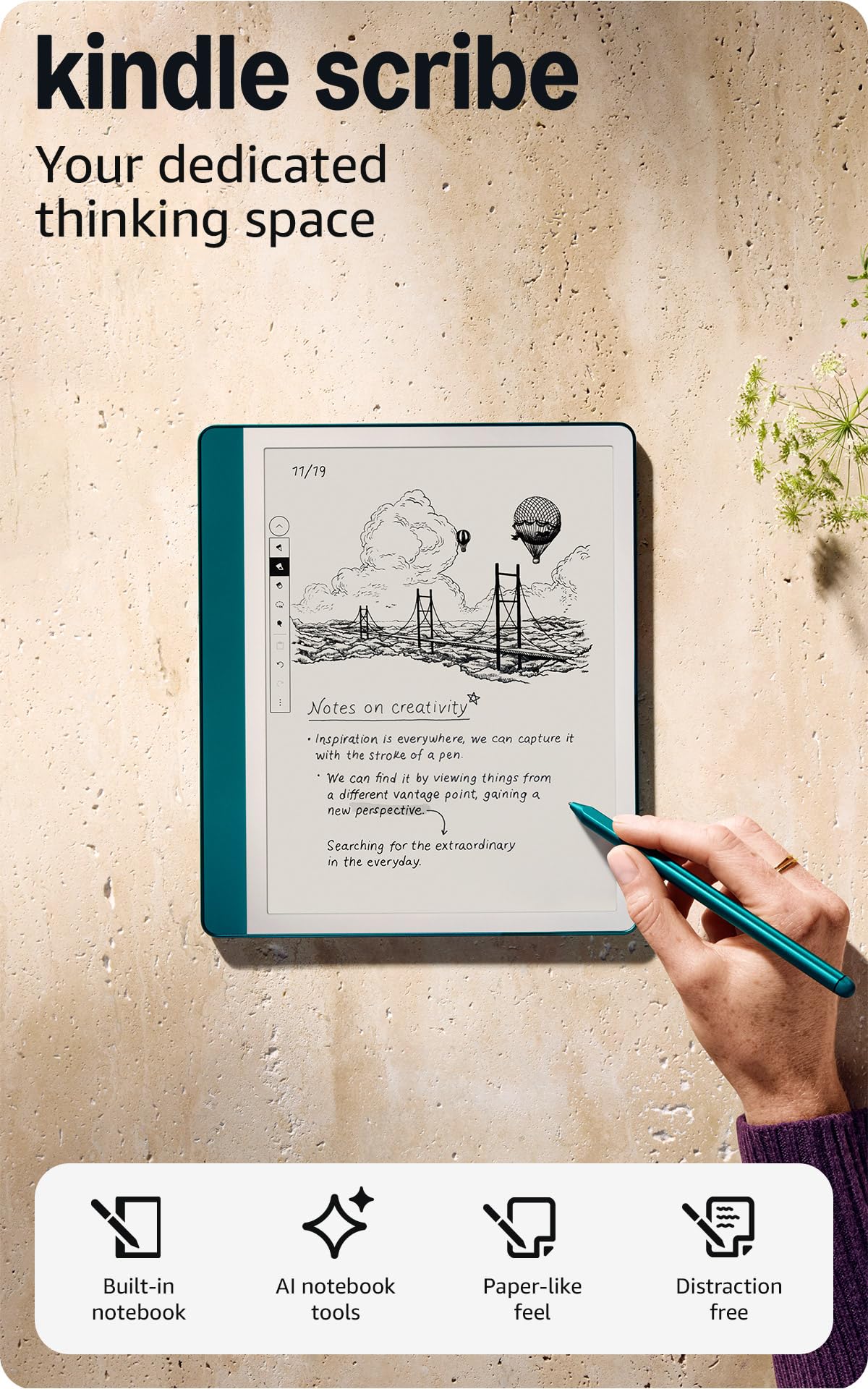
Kindle Scribe 64GB
If you like the calm focus of e-ink notepads but want more than a simple digital slab, the Kindle Scribe is one of those devices that quietly pulls double duty. You can read your Kindle library, annotate PDFs, and jot ideas with the Premium Pen that actually feels like pen on paper.
The 10.2″ glare-free display and long battery life mean you can use it all day without hunting for an outlet, and the on-device AI tools help turn messy handwriting into shareable text or quick summaries. For daily to-dos, meeting notes, or a weekend of deep drafting, it keeps everything together and searchable — and if you already own Kindle books, it folds reading and note-taking into one device. If you want a versatile e-ink notepad that’s also a reader and a decent PDF editor, it’s an easy recommendation to try.
What People Say
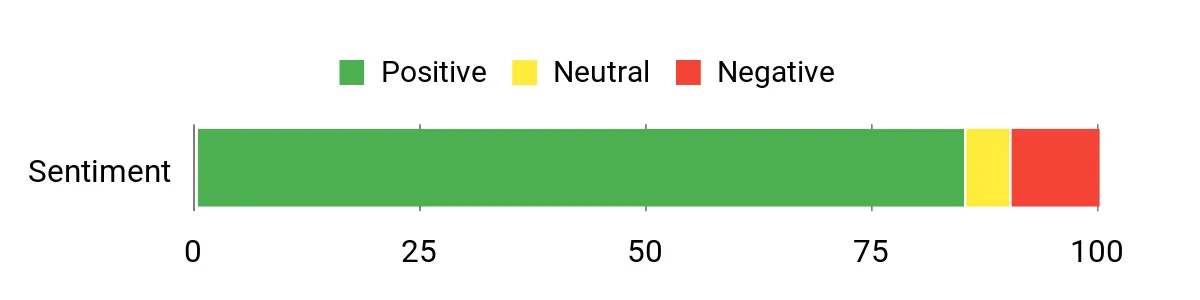
Most people praise the writing feel and the way the Premium Pen mimics paper, along with the convenience of having reading and note-taking in one device. Reviews often call out the AI notebook features and solid battery life, though a number of users mention a small learning curve with some of the software workflows.
Overall Sentiment: Positive
How It Helps In Real Life
Situation | How It Helps |
|---|---|
Daily Notes & To‑Dos | You can replace multiple paper notebooks, quickly capture ideas, and rely on handwriting recognition to turn those notes into editable text for later. |
Work Meetings | Import agendas or PDFs, annotate them on the spot, and email or export your marked-up documents when you’re done. |
Studying & Research | Use the AI summarization and handwriting-to-text to condense chapters and organize highlights without flipping through physical pages. |
Travel & Field Work | Lightweight, long battery life and a glare-free screen make it easy to read and take notes on the go without worrying about outlets. |
Educational Value
You can use it to take clearer lecture notes, convert handwriting into searchable text, and produce quick summaries for revision. Teachers and students will appreciate templates, PDF markup for handouts, and the ability to export notes for study sessions.
Ease Of Use
Feature | Ease Level |
|---|---|
Initial Setup | Easy |
Writing Experience | Easy |
Document Import & Annotation | Moderate |
Handwriting-to-Text Conversion | Easy |
Navigating Advanced AI Tools | Moderate |
Versatility
It’s a reader, a note-taker, and a basic PDF workstation all in one — good for casual journaling, work notes, and light creative drafting.
Innovation
On-device AI notebook summarization and Active Canvas make it smarter than basic e-ink notepads by helping you organize and distill notes without extra apps.
Best For
Beginner to Intermediate
Key Benefits
- True pen-on-paper feel with the included Premium Pen
- Built-in AI tools to summarize notes and convert handwriting to text
- Large, glare-free 10.2″ Paperwhite display for comfortable reading and writing
- Good on-device storage and long battery life for extended use
- Easy PDF import and annotation with Send to Kindle
Rating: 4.4/5 (total: 2755+)
🎨 Best for Creatives

XPPen Magic Note Pad
If you want a paper-like writing surface but also the flexibility of color and apps, the XPPen Magic Note Pad is an easy device to live with. You get a matte, AG nano-etched display that cuts glare and three quick color modes via the X-Key, so switching from a Kindle Scribe-like black-and-white reading mode to a soft colored-paper look or full color for sketches is fast.
The X3 Pro Pencil 2 is battery-free, very sensitive, and magnetically docks to the side, so jotting down class notes, sketching ideas, or annotating PDFs feels natural. Because it runs Android 14, you can download drawing and note apps or use the built-in XPPen Notes for handwriting-to-text, audio recording, and cloud backup. If you’ve admired the BOOX Note Air3 for its e-ink chops but wanted color and a livelier refresh rate, this is a good middle ground to consider — great for students, creatives, and anyone who wants a single, portable device for reading, taking notes, and light drawing.
What People Say
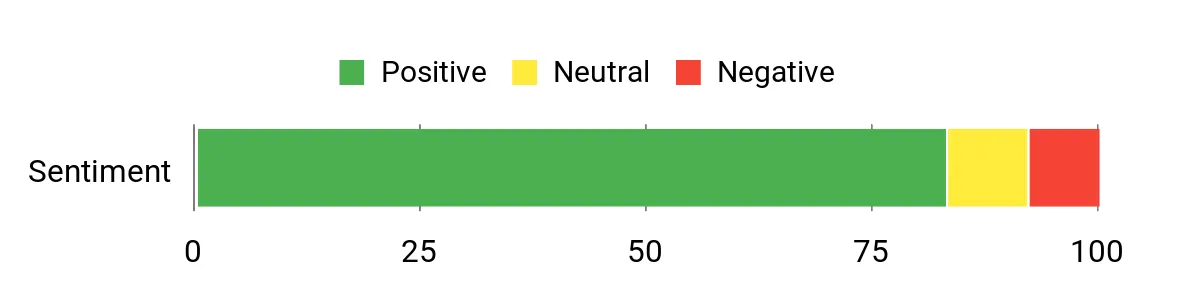
Users commonly praise the pen feel and the paper-like screen texture, noting that writing and sketching feel more natural than on smooth glass. Many like the three display modes and the built-in XPPen Notes features (handwriting-to-text, PDF markup and audio recording), while a smaller group flags viewing-angle limits and the usual Android app quirks compared with dedicated e-ink devices.
Overall Sentiment: Positive
How It Helps In Real Life
Situation | How It Helps |
|---|---|
Daily Notes & To‑Dos | Quick wake-to-notes, seamless handwriting-to-text, and cloud export let you capture ideas on the fly and keep everything searchable. |
Creative Sketching & Illustration | The 16K pressure pencil and matte finish give you nuanced strokes and resistance that feel closer to paper for sketching and inking. |
Reading & Study | Switch to the monochrome or light colour modes to reduce eye strain while annotating PDFs or reading e-books for long sessions. |
Meetings & Remote Work | Built-in mic, camera and note app make it easy to take annotated meeting notes, record audio, and share highlights afterward. |
Educational Value
Great for students and teachers: convert handwriting to text for assignments, record lectures while you write, annotate PDFs and export notes for study sessions. Templates and cloud sync make revision and sharing straightforward.
Ease Of Use
Feature | Ease Level |
|---|---|
Initial Setup | Easy |
Writing Experience | Easy |
Color Mode Switching | Easy |
App Installation & Multi‑tasking | Moderate |
File Management & Export | Moderate |
Versatility
It doubles as a note-taker, sketchbook, e-reader and lightweight Android tablet — handy for students, commuters, and creatives who want color modes plus native note features.
Innovation
Combines an AG nano-etched LCD with TCL NXTpaper-style tech and an X-Key that flips between three color modes, plus a high-sensitivity X3 Pro Pencil 2 to bridge the gap between e-ink calm and a full-color tablet.
Best For
Intermediate to Advanced
Key Benefits
- Paper-like matte AG nano-etched display that reduces glare
- Three one-touch color modes for reading, note-taking, and full color
- X3 Pro Pencil 2 with 16K pressure sensitivity and magnetic attachment
- Native XPPen Notes app with handwriting-to-text, audio recording, and cloud export
- Android 14 ecosystem and 128 GB storage for apps and files
Rating: 4.4/5 (total: 153+)
🚀 Best Color E‑Ink

BOOX Note Air 5 C
If you’re curious about color e-ink notepads but want the flexibility of apps, the BOOX Note Air 5 C walks that line well. The 10.3″ Kaleido 3 screen gives you readable color for comics, PDFs and light sketches without the glare of an LCD, while Android 15 and Play Store access turn this into a practical digital writing tablet for everyday use.
The 4,096‑level stylus, finger‑print power button and expandable storage make it useful for study sessions, meetings, or travel, and the front light helps when the color panel looks a touch darker than you expect. I’d recommend it if you want a single device that behaves like an e-ink notepad for long reads and note-taking, but also doubles as a savvy Android-backed tool — just be ready to manage battery and occasional software quirks.
What People Say
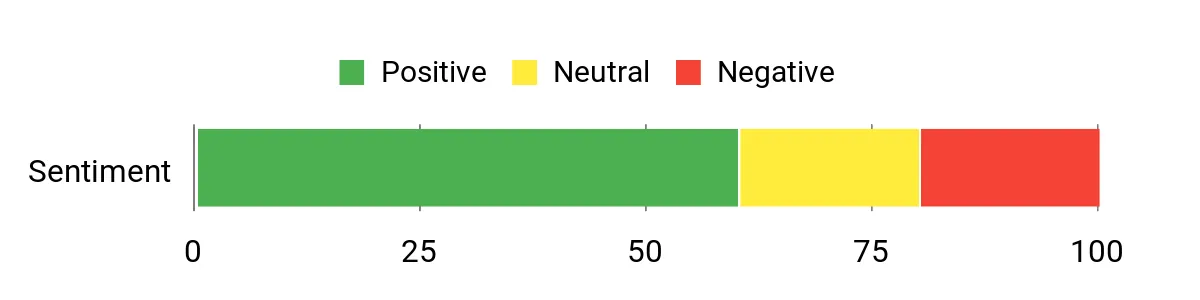
Across reviews people like the color capability and the flexibility that Android brings — being able to read comics, use Kindle or install apps is often called out. Customers also note solid build quality and a generally good handwriting experience, but many flag the darker Kaleido 3 look, shorter battery life compared with monochrome e-ink devices, and occasional software or stylus quirks.
Overall Sentiment: Mixed
How It Helps In Real Life
Situation | How It Helps |
|---|---|
Daily Notes & To‑Dos | Quick wake, reliable note apps and a responsive stylus make capturing tasks and meeting notes simple and searchable. |
Reading Comics & Color PDFs | Kaleido 3 brings color to e-books and comics so graphics look better than on monochrome e-ink, while the matte surface reduces glare for long sessions. |
Travel & On‑the‑Go Work | Lightweight 10.3″ size, microSD support and Android apps mean you can carry one device for reading, reference and quick edits. |
Study & Research | Annotate PDFs, install study apps and store large libraries locally so you can review and mark up material without switching devices. |
Educational Value
Strong for students who annotate PDFs and want a distraction‑reduced reading surface plus app flexibility. Handwriting recognition, templates and expandable storage make it easy to organize notes and export study material.
Ease Of Use
Feature | Ease Level |
|---|---|
Initial Setup | Easy |
Writing Experience | Moderate |
App Installation & Multi‑tasking | Moderate |
Battery Management | Moderate |
File Management & Export | Moderate |
Versatility
This is a true hybrid: a calm e-ink notepad for long reading and handwriting sessions that also behaves like a small Android tablet. It’s great for reading, annotating, sketching light color work and running reference apps when you need them.
Innovation
Combines Kaleido 3 color e-ink with Android 15 on an e‑ink panel, bringing broader app access to digital writing tablets while keeping the energy-efficient, paper-like reading experience.
Best For
Intermediate to Advanced
Key Benefits
- Kaleido 3 color e‑ink on a 10.3″ display for readable color content
- Android 15 with Play Store access for apps beyond basic note-taking
- 4,096‑level stylus and textured glass for a comfortable handwriting feel
- 64 GB internal storage plus microSD support for large document libraries
- Front light, fingerprint power button, USB‑C with OTG and dual speakers for everyday convenience
Rating: 3.9/5 (total: 27+)
🔰 Best Compact Color

BOOX Go Color 7 Gen II
If you want a pocketable color e‑ink device that also behaves like a mini Android tablet, the BOOX Go Color 7 Gen II is a solid pick. You get a 7″ Kaleido 3 screen that brings muted but readable color to comics and PDFs, plus Android 13 so you can install apps and use it alongside true digital writing tablets like the BOOX Note Air3.
It’s light and easy to hold for long reading sessions, has physical buttons for page turns, and supports an active InkSense stylus if you want to annotate. If you travel often or just want a less-distracting place to read and jot quick notes, this one balances portability and app flexibility — just be aware of the usual color e‑ink tradeoffs and some reports of touch or ghosting quirks.
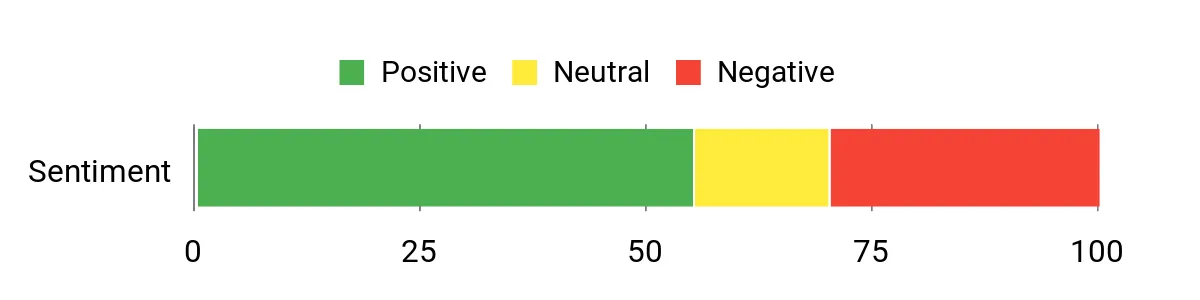
What People Say
People tend to like the Android flexibility and the fact you can run Kindle, Libby or other reading apps on a color e‑ink screen. Many reviewers praise the build, the physical buttons and how lightweight it is, while common complaints focus on muted/darker color tones, occasional ghosting or touch issues, and variability in hardware quality.
Overall Sentiment: Mixed
How It Helps In Real Life
Situation | How It Helps |
|---|---|
Daily Reading & Notes | A fast wake and app access make jumping into ebooks, PDFs or simple note apps convenient, while the compact size keeps it lightweight for daily use. |
Comics And Graphic PDFs | Kaleido 3 adds color so artwork reads better than monochrome e‑ink, reducing eye strain compared with LCDs for longer sessions. |
Travel And Commuting | Small footprint, physical page buttons and long standby life mean you can carry one device for reading on the go without a bulky tablet. |
Quick Annotation | Support for an active InkSense stylus lets you mark up documents or sketch ideas when you need a quick, paper‑like surface. |
Educational Value
Good for students who want a distraction‑reduced reading surface plus app access; you can annotate PDFs, store lots of materials on 64 GB, and use study apps thanks to Android support.
Ease Of Use
Feature | Ease Level |
|---|---|
Initial Setup | Easy |
Reading Experience | Easy |
Writing/Annotation | Moderate |
Managing Ghosting & Color Settings | Moderate |
App Installation | Moderate |
Versatility
This is a compact hybrid: mostly an e‑ink reader that can run Android apps and accept an active stylus, so it works for reading, light annotation, and running reference apps without needing a full tablet.
Innovation
Puts Kaleido 3 color e‑ink into a pocketable 7″ form factor while pairing it with Android 13 and active stylus support, making color e‑ink more useful for casual comics, PDFs and quick note tasks.
Best For
Intermediate
Key Benefits
- 7″ Kaleido 3 color E‑Ink for readable color on comics and PDFs
- Android 13 with access to third‑party reading and productivity apps
- Supports Active Stylus InkSense for annotations (stylus sold separately)
- Compact, lightweight design with page‑turn buttons and dual speakers
- 64 GB storage plus microSD and USB‑C (OTG) for easy file transfer
Rating: 3.7/5 (total: 148+)
🔗 Best Paper‑to‑Digital

Ophaya Pen
If you like the feel of paper but want your notes living on your phone or iPad, this pen bridges the gap. You write on the included dot‑code notebook or the writing board and everything syncs in real time to the Ophaya Pro+ app, where handwriting can be turned into editable text, searched, and exported.
It’s especially handy if you own e‑ink notepads or a Kindle Scribe for reading and reference — use the pen for quick paper sketches or meeting notes, then send clean text to your tablet or cloud. For everyday to‑do lists, class notes, or client meetings the setup feels familiar and keeps things organized; just be aware it relies on brand paper for full functionality.
If you want a paper‑first workflow that snaps into digital files, this is an approachable, practical choice.
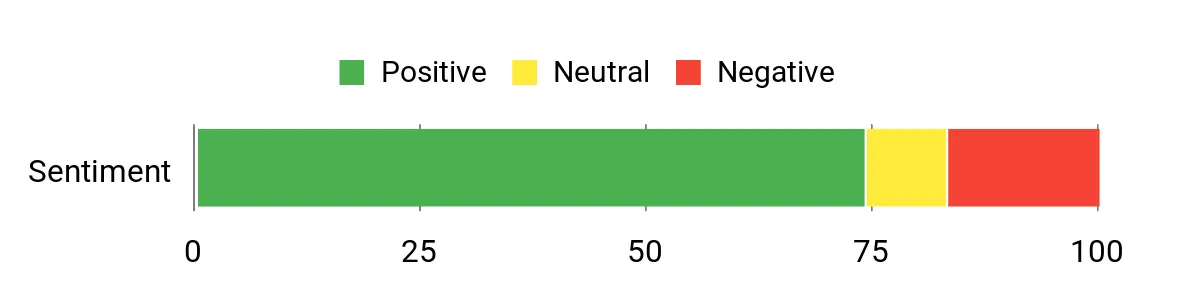
What People Say
Customers commonly praise how naturally the pen writes on the supplied notebook and how reliably notes sync to the app. People like the OCR and searchable notes for turning scribbles into usable text, and many appreciate the audio‑sync feature for meetings and lectures. On the flip side, reviewers often mention the app experience and navigation could be smoother, and the need for brand‑specific paper is a recurring practical limitation.
Overall Sentiment: Positive
How It Helps In Real Life
Situation | How It Helps |
|---|---|
Meetings & Client Work | You can jot notes by hand without losing the digital trail — audio sync and timestamping make follow‑ups painless and sharing summaries quick. |
Lectures & Study | Write in class like you always do, then convert handwriting to text for study guides or searchable archives later on your phone or tablet. |
Sketching & Diagrams | The included writing board handles sketches and diagrams, which sync as images you can annotate or export for reports or creative work. |
Travel & On‑the‑go Notes | Offline storage means you can keep capturing ideas without your phone nearby, then upload everything once you reconnect. |
Educational Value
Great for students who prefer handwriting but need digital notes — it records lectures, makes notes searchable, and converts handwriting into editable documents for essays or revisions.
Ease Of Use
Feature | Ease Level |
|---|---|
Initial Setup | Moderate |
Writing Experience | Easy |
OCR/Text Conversion | Moderate |
App Navigation & Playback | Moderate |
Paper & Refill Management | Moderate |
Versatility
This is a paper‑first tool that also behaves like a digital recorder and scanner: ideal if you want both physical notebooks and searchable digital archives. It works well alongside e‑ink notepads and devices like the Kindle Scribe for organizing and archiving notes.
Innovation
Combines traditional handwriting with instant digitizing, OCR and audio‑linked notes in one affordable pen set; the dot‑code paper approach keeps the tactile paper workflow while unlocking digital features.
Best For
Beginner to Intermediate
Key Benefits
- Real‑time Bluetooth sync to the Ophaya Pro+ app for instant digitizing
- OCR converts handwriting to editable text and supports export to Word/PDF
- Searchable notes with tags and timestamps so you can find ideas fast
- Records audio while you write and links playback to written notes
- Offline storage lets you keep writing even without your phone connected
Rating: 4.0/5 (total: 395+)
💰 Best Value

Kindle Scribe 32GB
If you want a single device that replaces stacks of notebooks and still reads like a Kindle, the Kindle Scribe 32GB is an easy pick. You get a roomy 10.2″ Paperwhite display that’s pleasant for long reading sessions and comfortable for handwriting with the included Premium Pen — no charging required.
The on‑device AI helps summarize notebooks and convert messy handwriting into editable text, and Active Canvas makes jotting notes inside books feel seamless. Use it for daily to‑do lists, journaling, and marking up work PDFs, but it’s also great for focused weekend projects like planning a trip or drafting a short book. If you like the paper‑like feel of an e‑ink notepad but still want access to a vast ebook library, this blends both worlds—think of it as a reader that really wants to be your digital notebook (and yes, if you’re comparing it to more specialized devices like the BOOX Note Air3, the Scribe leans heavier into the Kindle ecosystem and simplicity).
I’d recommend it if you value distraction‑free writing with tight Kindle integration and useful AI tools.
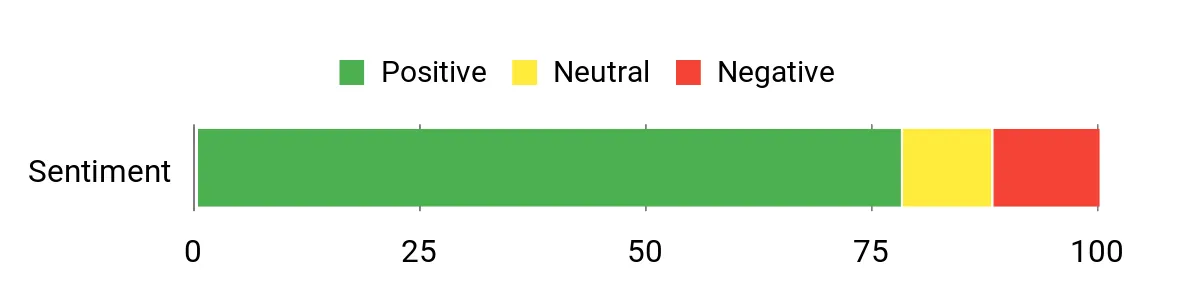
What People Say
Readers and note‑takers often praise how natural the pen feels and how smoothly writing flows on the screen. Many like the AI features that summarize notes and convert handwriting, plus the ability to mark up PDFs and read from the Kindle library. Common critiques touch on occasional software clunkiness or a small learning curve when switching between reading and writing modes.
Overall Sentiment: Positive
How It Helps In Real Life
Situation | How It Helps |
|---|---|
Daily Planning & Journaling | Replace multiple paper journals with searchable notebooks and use AI summaries to review your week or pull highlights quickly. |
Work Documents & Markups | Import PDFs to annotate directly — handy for editing drafts, signing forms, or marking up reports without printing. |
Study & Research | Highlight passages, take margin notes on ebooks, and convert handwritten notes to text for essays or study guides. |
Creative Projects | Sketch ideas or outline a draft on a distraction‑free e‑ink display, then export text or images to your workflow. |
Educational Value
Great for students who prefer handwriting but need digital organization — annotate readings, convert notes to editable text, and keep everything searchable for revision or citation.
Ease Of Use
Feature | Ease Level |
|---|---|
Initial Setup | Easy |
Writing Experience | Easy |
AI Summarization & Handwriting Conversion | Moderate |
PDF Import & Annotation | Moderate |
Switching Between Reading & Writing Modes | Moderate |
Versatility
The Scribe doubles as an e‑reader and a focused digital notebook: it’s ideal if you want to read, annotate, and keep hand‑written notes all in one device. It won’t replace color e‑ink tablets like the BOOX Note Air3 for illustrators, but for writers and readers who want Kindle integration, it’s a versatile daily driver.
Innovation
Combines Amazon’s Paperwhite reading experience with on‑device AI tools and Active Canvas note flow, bringing smart notebook features to a mainstream ebook ecosystem.
Best For
Beginner to Advanced
Key Benefits
- Paper‑like writing experience with the Premium Pen that needs no charging
- Built‑in AI notebook summarization and handwriting‑to‑text conversion
- 10.2″ 300 ppi front‑lit Paperwhite display for comfortable reading and writing
- Active Canvas lets you take notes directly on book pages and expand margins
- Easily import and annotate PDFs and documents via Send to Kindle
- Long battery life suitable for weeks of regular use
Rating: 4.4/5 (total: 2755+)
FAQ
How Do ReMarkable 2 Alternatives Compare For Writing Feel And Eye Comfort?
When you compare devices like the Amazon Kindle Scribe, BOOX Note Air series, XPPen Magic Note Pad and other options, the core differences come down to screen technology and software. If you value a true paperlike writing-on-paper feel, ReMarkable and some BOOX models are tuned for minimal lag and high stylus friction; Kindle Scribe also gets very close and adds tight integration with the Kindle ecosystem. XPPen is more of a hybrid tablet that uses an LCD with matte treatment to mimic paper while giving you color and more app flexibility. For long reading and note-taking sessions you’ll want an e-ink notepad or true e-ink digital writing tablet because those screens reduce eye strain; color e-ink devices trade some contrast and battery life for color support, so expect a different look and occasionally more ghosting compared with black-and-white e-ink.
Try to test the pen tip and refresh behavior if you can, because perceived lag, eraser behavior and ghosting vary by model and firmware.
What Should You Consider When Choosing Between Kindle Scribe, BOOX And Other Digital Writing Tablets?
Decide what matters most to you: ecosystem, file compatibility, app access, or the pure handwriting experience. If you want seamless access to your Kindle library, built-in features like AI notebook summarization and easy PDF annotation, the Kindle Scribe is compelling; if you need Android app support, cloud flexibility and broad format support (EPUB, PDF, third-party reading apps), BOOX devices tend to be more open. XPPen and similar hybrid tablets give you color modes, higher refresh rates and an all-in-one Android experience but they aren’t true e-ink notepads and may behave like a conventional tablet with a paperlike finish.
Look at stylus type (battery-free vs rechargeable), tip replacements, storage options, how handwriting-to-text and export work, and whether the vendor provides reliable firmware updates and customer support. Also check included accessories and whether a magnetic pen attachment, case or spare nibs are available, because those small details affect daily convenience.
How Practical Are These Devices For Day-To-Day Note Taking, Syncing And Sharing?
You can make them very practical if you match the device to your workflow. Confirm file compatibility and export options before buying: some devices convert handwriting to text on-device, others require an app or cloud service. If you need fast sharing and multi-device sync, pick a model with a mature cloud solution or Android app ecosystem; Kindle Scribe is excellent for Amazon-centric workflows and on-device AI summaries, while BOOX and XPPen let you install or use third-party apps for broader syncing.
Battery life and wake-from-sleep behavior matter: e-ink notepads usually give the longest standby for reading and occasional writing, whereas hybrid tablets trade battery for color and responsiveness. For best day-to-day results, update firmware, keep spare nibs, enable automatic backups to your preferred cloud, and test a few common file operations (PDF markup, notebook export, handwriting-to-text) during the return window so you’re sure the device fits your habits.
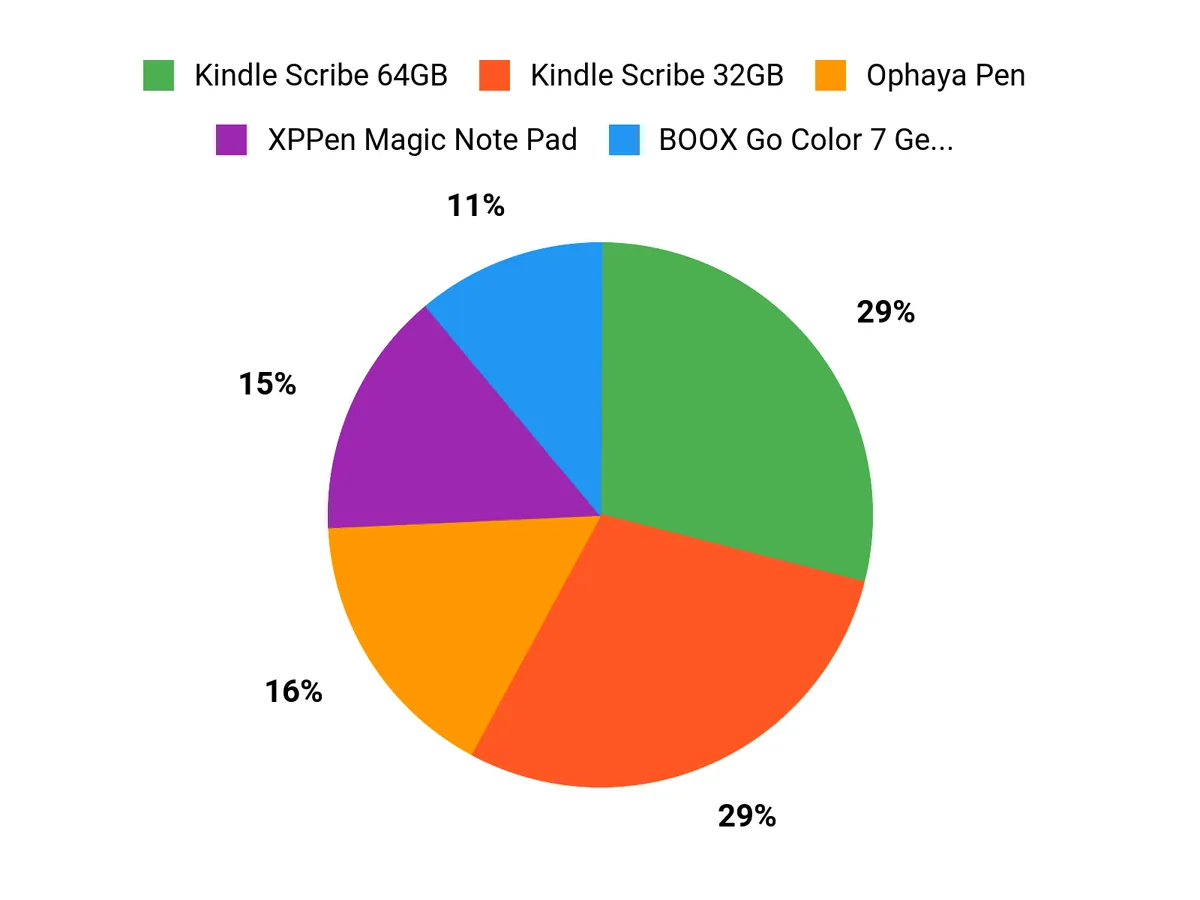
What Buyers Prefer
You tend to choose based on what you value most: if you care about the pure reading experience and seamless access to Amazon’s ecosystem with ample storage you’ll lean toward the Kindle Scribe 64GB; if you want an affordable, lightweight pad for quick notes and sketches you’ll gravitate to the XPPen Magic Note Pad; and if you need maximum flexibility, app support and broad file compatibility for heavy annotation or multi‑app workflows you’ll prefer the BOOX Note Air 5 C. In short, buyers prioritize ecosystem and reading-first features, price and portability, or versatility and app/file support depending on their workflow.
Wrapping Up
Pick a device that matches how you use notes and reading. If you read heavily and want a single device for books, PDFs and long handwritten notebooks, the Kindle Scribe models give you the most polished reading + writing experience and strong storage options. If you sketch, take lecture notes, or want a color-capable e-paper experience, consider the XPPen or BOOX color devices. The Ophaya pen is the most budget-friendly way to get accurate paper-to-digital capture without changing your writing habits.
Whichever route you take, these alternatives show the range of what modern digital writing tablets can do — and if you’re curious about BOOX devices specifically, remember older references like the BOOX Note Air3 are useful comparison points for writing feel and app ecosystem when you evaluate newer models.
| Product | Image | Rating | Display Specs | Battery Life | Storage Capacity | Weight | Unique Highlights |
|---|---|---|---|---|---|---|---|
| Amazon Kindle Scribe (64GB) |  | 4.4/5 (N reviews) | 10.2 Inches, 300 PPI, 16-level gray scale, Paperwhite display technology with built-in light. | Up to 12 weeks for reading, 3 weeks for writing, based on usage. | Available in 16 GB, 32 GB, 64 GB. | 15.3 ounces (433g) |
|
| XPPen 3 in 1 Color Digital Notebook |  | 4.4/5 (153 reviews) | 10.95 Inches, 1920 x 1200 resolution, triple color mode. | Up to 4 hours | 128 GB | 10.6 ounces |
|
| BOOX Tablet 10.3″ Note Air 5 C |  | 3.9/5 (27 reviews) | 10.3 Inches, 300 PPI in Black, 150 PPI in Color, E Ink technology. | N/A | 64 GB | 2.09 pounds |
|
| BOOX Tablet Go Color 7 Gen II |  | 3.7/5 (148 reviews) | 7 Inches, 300 dpi in Black, 150 dpi in Color. | Acceptable, with auto power off feature. | 64 GB | 13.7 ounces |
|
| Ophayapen Smart Sync Pen |  | 4.0/5 (395 reviews) | N/A | N/A | N/A | 2.44 pounds |
|
| Amazon Kindle Scribe (32GB) |  | 4.4/5 (N reviews) | 10.2 Inches, 300 PPI, Paperwhite display technology. | 12 weeks for reading, 3 weeks for writing. | Available in 16 GB, 32 GB, or 64 GB. | 15.3 ounces (433g) |
|
This Roundup is reader-supported. When you click through links we may earn a referral commission on qualifying purchases.